
Engineering · Apex · Governor Limits
try/catch Won't Save You: Three Lessons from the Apex Exception You Can't Catch
You've written it. We've all written it. It's the most reassuring shape in Apex: a try, a catch, a log line, maybe an email to the team.
Then a transaction hits a governor limit, and you find out the catch block was decorative.
A System.LimitException cannot be caught. Not by catch (Exception e), not by anything. When code runs out of heap or CPU time, or (the one that got us first) the regex engine gives up, Apex ends the transaction on the spot. The rollback takes your error log with it. The failure erases its own evidence.
We learned this, more than once, while building SmartSeed. Here are three of those lessons, the real code behind them, and the mistakes we made on the way.
First, some context: what SmartSeed does
SmartSeed copies related records between Salesforce orgs: for example, Accounts with their Contacts and Opportunities, from production into a sandbox. It masks the sensitive fields you choose before they leave the source org, so the test data that arrives is safe to work with.
It's a managed package installed in both orgs, and it has no external server. Finding the records, masking them, sending them, and recreating them on the other side all run as Apex inside the two orgs. So the data never passes through anyone else's infrastructure. It also means every step lives inside Salesforce's governor limits, such as 12 MB of heap per asynchronous transaction.
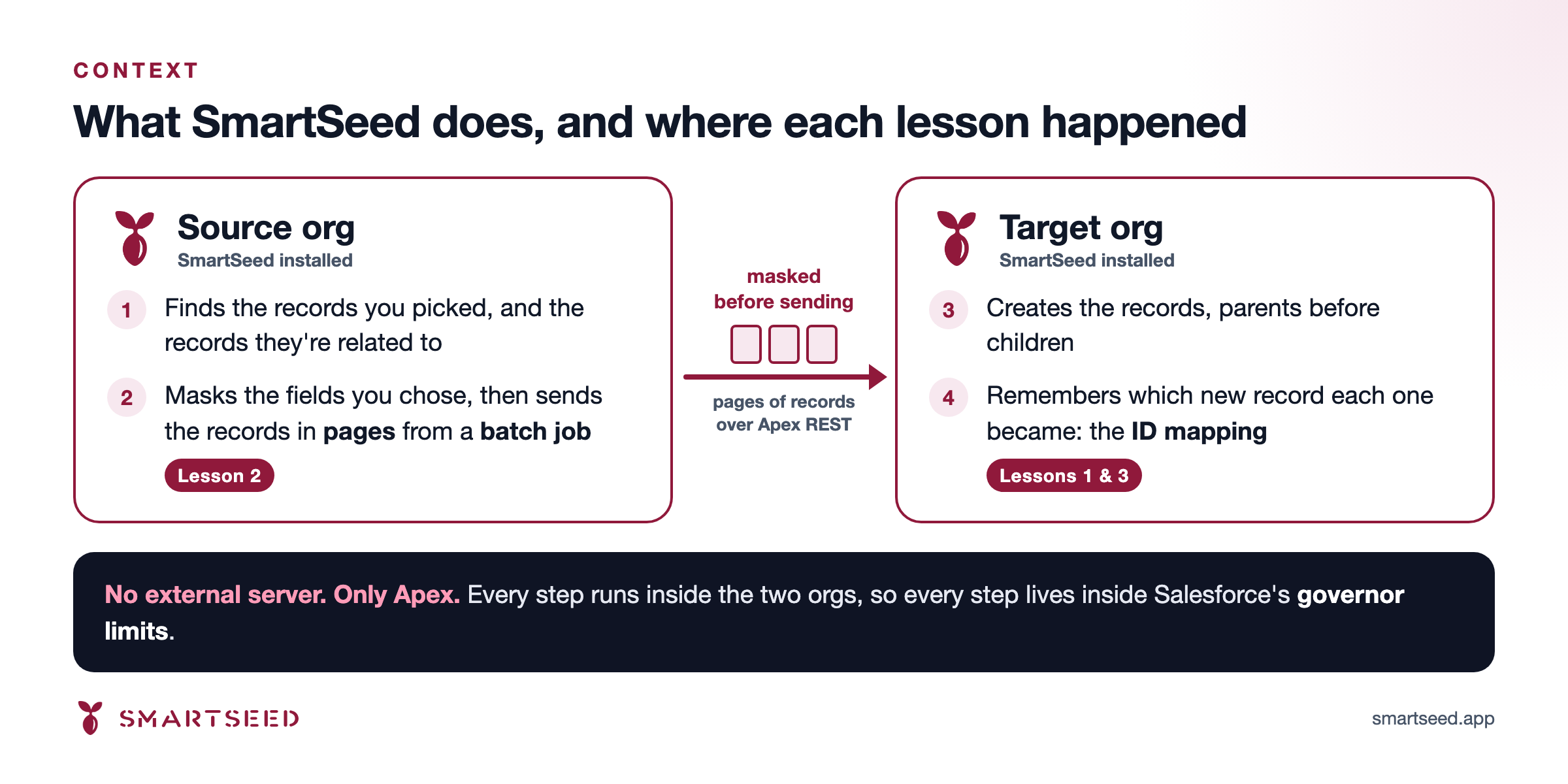
The source org sends pages of records from a batch job; the target org creates them and remembers which new record each one became, in what we call the ID mapping.
Two terms will come up. A page is a chunk of records that's sent and created together. The ID mapping records which target record each source record became, so that a Contact arriving later can find the new ID of its Account.
Lesson 1: The catch was three lines away
The target org keeps its ID mapping in text files, one source ID, target ID pair per line. To read them, we split the text into lines with String.split. Reasonable. Readable. Wrong.
String.split doesn't take a string to split on; it takes a regular expression. Give it enough text and the regex engine gives up with System.LimitException: Regex too complicated. We measured where the cliff is, in a scratch org: 8,000 rows (304 KB) split fine; 9,000 rows (342 KB) ended the transaction. (That's what we measured for this pattern in that org. Treat it as an order of magnitude, not a platform constant.)
Here's the code as it was:
String s = data.toString();
List<String> rows = s.split('\n', 0);
for (String row : rows) {
    List<String> cols = row.split(',', 2);
    if (cols.size() != 2)
        continue;
    try {
        Id o = (Id) cols[0].trim();
        Id n = (Id) cols[1].trim();
        out.add(new Pair(o, n));
    } catch (Exception ignore) {
        // skip malformed
    }
}
Our favourite part is three lines from the bottom: a catch (Exception ignore), conscientiously guarding against a malformed comma. It was protecting the house from mice while the roof came off.
What it cost: 14 pages of records silently not created, on two separate test runs with large volumes. There was no error anywhere, because the error had been rolled back along with everything else. Minutes later a watchdog declared the run stalled, with nothing useful to say about why.
The fix is boring, which is the point. Scan the text with indexOf and substring, one line at a time:
Integer position = 0;
Integer length = s.length();

while (position < length) {
    Integer newline = s.indexOf('\n', position);
    Integer rowEnd = (newline < 0) ? length : newline;
    String row = s.substring(position, rowEnd);
    position = (newline < 0) ? length : newline + 1;

    if (String.isBlank(row))
        continue;

    Integer comma = row.indexOf(',');
    if (comma < 0)
        continue;

    try {
        // trim clears the carriage return of a CRLF file as well as any padding.
        Id o = (Id) row.substring(0, comma).trim();
        Id n = (Id) row.substring(comma + 1).trim();
        out.add(new Pair(o, n));
    } catch (Exception ignore) {
        // skip malformed
    }
}
Same output, no regex engine. As a bonus, peak heap dropped from 633 KB to 305 KB, because we no longer build every line in memory up front. We then found the same split in more places than we'd like to admit.
Notice the catch is still there, and that's correct. A malformed ID is an ordinary exception, and catch handles those fine. The catch was never the problem. Expecting it to handle a governor limit was.
Lesson: if the size of the input comes from customer data, don't hand it to a regex.
Lesson 2: A dead scope can't report itself, so count who came back
Batch Apex makes this worse. SmartSeed sends pages from a batch job, one page per scope. When a scope's execute() dies on a limit, its whole transaction rolls back. Our page stayed "Pending": no attempt counted, no error logged.
So finish() looked around, saw a page still waiting, and dutifully queued the batch again. The page died again. And again. Groundhog Day with governor limits, while the screen said "Sending" the entire time, with total confidence. And if you looked up the job, its status said Completed.
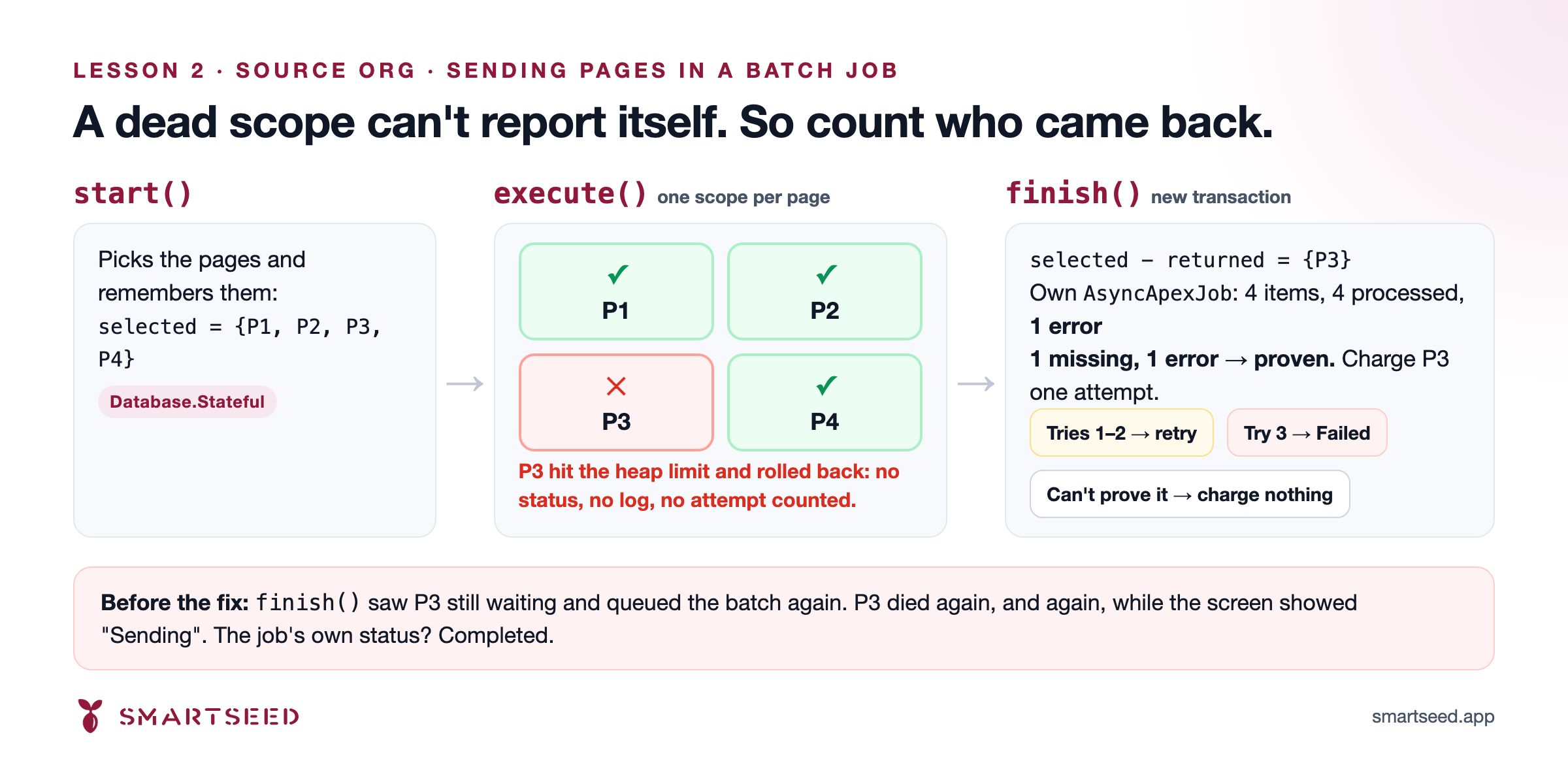
finish() runs in a new transaction. Comparing the pages it selected with the pages that came back shows which scope died.
The way out: a dead scope can't speak, but finish() runs in a fresh transaction, and Database.Stateful state survives the rollback. So the batch keeps two sets: the pages it selected in start(), and the pages whose execute() came back. The difference is the pages that died.
We don't trust that difference on its own. finish() also reads its own AsyncApexJob row:
SELECT TotalJobItems, JobItemsProcessed, NumberOfErrors, ExtendedStatus
FROM AsyncApexJob
WHERE Id = :bc.getJobId()
WITH USER_MODE
LIMIT 1
Only when the number of missing pages exactly matches the job's error count does it charge each of them an attempt:
Set<Id> unreturned = new Set<Id>(selectedStubIds);
unreturned.removeAll(returnedStubIds);
// ... load the pages still Pending or RetryScheduled into `stuck`

JobOutcome job = readJobOutcome(bc);
Boolean accountedFor =
    job != null &&
    job.totalItems == selectedStubIds.size() &&
    job.itemsProcessed == job.totalItems &&
    job.errors == stuck.size();
if (!accountedFor) {
    return;
}

for (Page_Stub__c stub : stuck) {
    stub.Attempts__c = (stub.Attempts__c == null) ? 1 : stub.Attempts__c + 1;
    stub.Last_Error__c = reason.left(32768);
    if (stub.Attempts__c < MAX_SEND_ATTEMPTS) {
        stub.Status__c = 'RetryScheduled';
        continue;
    }
    stub.Status__c = 'Failed';
    fatalErrorDetected = true;
    // ...
}
Three strikes and the page is marked Failed, and the run ends and says so. If the numbers don't line up, we charge nothing and carry on as before. A retry is safe here because the rollback left nothing half-written behind: the page is exactly as it was before the attempt.
Lesson: when the failing code can't talk, make the code around it notice the silence. And only act on what you can prove.
Lesson 3: Stop at a boundary, not at the limit
At the end of a run, the target org saves each object's ID mapping as a set of 16 files that we call buckets. For one large object (148,784 mappings) it tried to write all 16 in a single transaction, and died at 12,365,377 bytes of heap. The asynchronous limit is 12 MB.
Here's the embarrassing bit. Before anyone measured, we had three confident theories about the cause. All three were wrong.
What actually cracked it was a number the product already recorded. After each page's work, SmartSeed samples the heap and stores the higher reading on that page's record:
Integer pageHeapPeak = Limits.getHeapSize();

// Persist contexts after the page attempt, including partial progress
saveContexts(tempContext, bunkerCtx);
if (Limits.getHeapSize() > pageHeapPeak) {
    pageHeapPeak = Limits.getHeapSize();
}
// ...
stub.Peak_Heap_Bytes__c = pageHeapPeak;
Across all 187 pages of that run, the figure was flat at 700 to 760 KB. The pages were innocent, so the culprit had to be the end-of-run step. If you take one practical thing from this post, take this one: record your resource use while things go well, so that when they don't you have evidence instead of theories.
The fix was one extra condition. The loop already checked SOQL and DML before each bucket; now it checks heap too, and stops at a bucket boundary when there isn't room:
for (Integer bucket : buckets) {
    if (!hasRoomForOneBucket()) {
        // log "checkpoint stopped early"; the remaining buckets stay as records
        break;
    }
    // ... write this bucket's file, then delete the records it absorbed
}

private static Boolean hasRoomForOneBucket() {
    Integer soqlLeft = Limits.getLimitQueries() - Limits.getQueries();
    Integer dmlLeft = Limits.getLimitDmlStatements() - Limits.getDmlStatements();
    Integer heapLeft = Limits.getLimitHeapSize() - Limits.getHeapSize();
    return soqlLeft > SOQL_RESERVE && dmlLeft > DML_RESERVE && heapLeft > HEAP_RESERVE;
}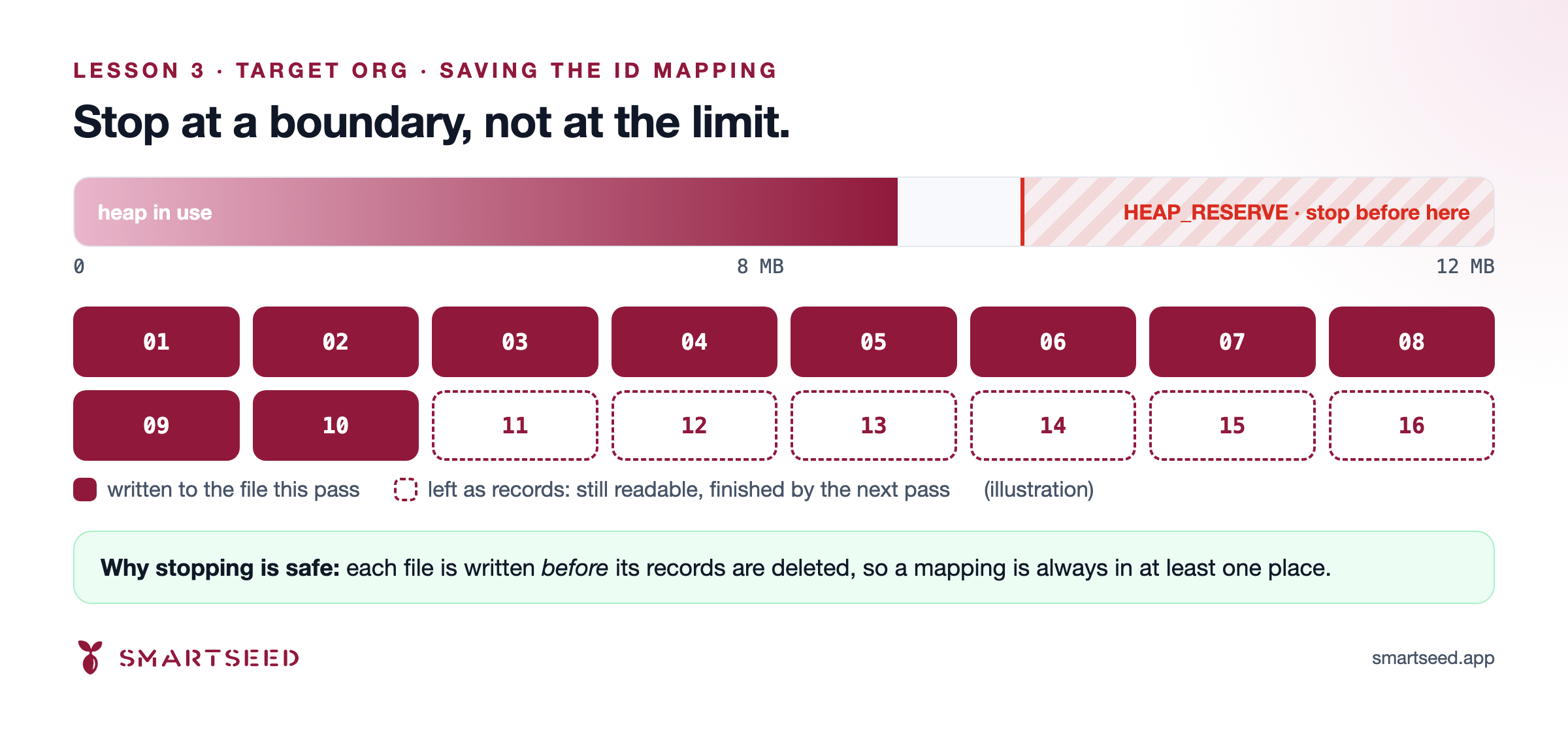
When heap runs low, the loop stops at a bucket boundary. The remaining buckets stay as records and the next pass finishes them.
Stopping is safe by design, and that's the part that matters. Each file is written before its records are deleted, so a mapping is always in at least one place, and every read already looks at both. The run finishes the job a little later instead of dying.
And in the spirit of honesty: HEAP_RESERVE is 4,000,000 bytes, and it's an educated guess. The comment above it in the code says so, and the code logs what each bucket really costs, so the guess can become a measurement.
Lesson: check Limits before each unit of work, stop at a clean boundary, and design so that stopping costs nothing.
Bonus: the Delete All that spun forever
SmartSeed can delete everything it created in a target org. To show progress, it first counts the records. For one very large object, that count read all 16 bucket files in a single query: 17.1 MB of file contents, against a 12 MB limit.
The counting code had a catch that said, in effect, "if counting fails, delete anyway". It never ran. The transaction died, the deletion never started, and the dialog simply spun.
Our first theory blamed the set of record IDs, which we estimated at 19 MB, and we started designing an approximate count around that number. Then we measured it: 4.95 MB. It fit comfortably. The file contents were the whole problem. The fix reads each file's size first and fetches the contents in batches of about 1.2 MB, so an ordinary object still takes one query and the largest takes a handful. A later test run counted 264,143 records this way, end to end.
Lesson: measure before you design around a limit. Our guesses were wrong more often than they were right.
What we'd tell you
- catch protects you from your bugs, not from the platform's limits. A LimitException ends the transaction, and the catch block never runs.
- Don't reach the limit. When the size of the input comes from customer data, bound what one transaction touches.
- Check Limits before each unit of work. Stop at a clean boundary, and design so that stopping is safe.
- Detect failure from the outside. The next transaction can count what didn't come back.
- Leave yourself evidence. Record resource use while things go well.
- Measure first. Then design.
Where these lessons come from
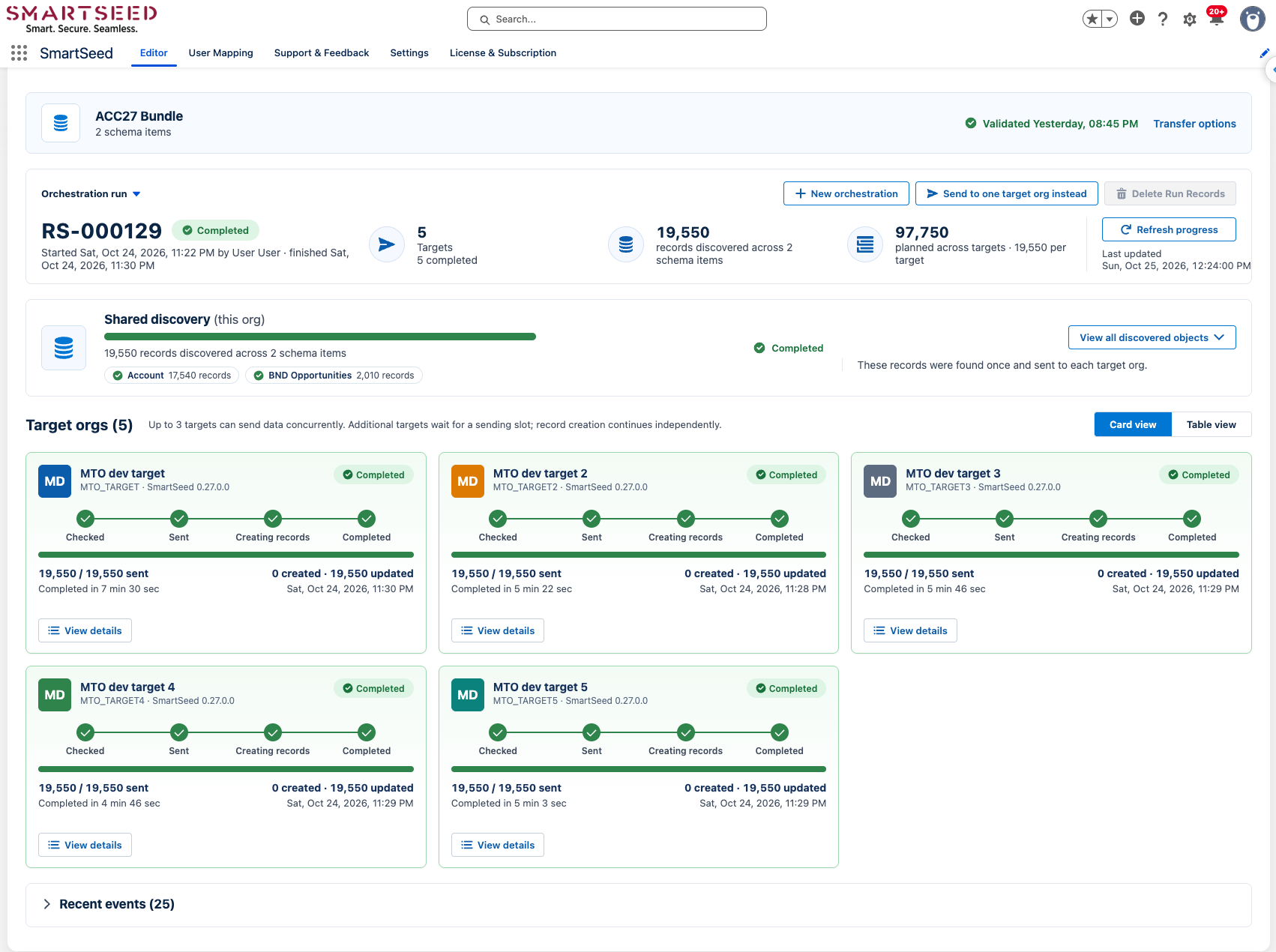
One selection sent to five target orgs, 19,550 records each, every one completed.
This is SmartSeed sending one selection of records to five target orgs at once, 19,550 records to each, all completed. It runs on the same engine, and inside the same governor limits, as everything in this post.
SmartSeed is available now. Install it in a sandbox, or take our Sandbox Data Readiness Scorecard to see how closely your test environments reflect production
And we'd like to hear from you: how does your team find out that a transaction died on a governor limit? The Apex Jobs page, job error counts, a heartbeat, or a user asking why nothing happened?